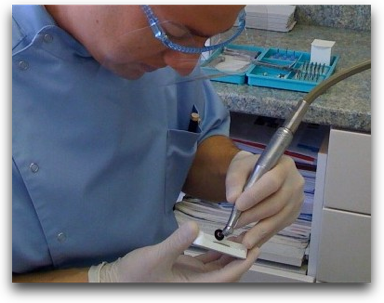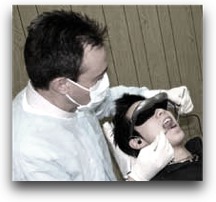
You’ve watched way too many movies.
If you’ve got images of Star Trek’s Geordi LaForge, nerdy sidekicks in 80’s new-wave glasses a la John Hughes’ teen films, or the horrors of Total Recall memory augmentation burned into your retinas, then please, let those prejudiced views slide gently outside of your peripheral vision and consider that Virtual Reality glasses may actually be good and cheap enough these days to make them part of your patient comfort collection.
We want to heavily discourage dentists from spending thousands of dollars in wall or ceiling-mounted screens just so that patients can have something to look at besides your ugly mug while you’re fixing their teeth.
We’re not kidding.
The problem with screens like that, during dentistry, is that your head keeps getting in the way while your patient is trying to remain distracted.
There’s lots of other details that can end up complicating the whole thing, so instead of making this a gripe session about overbloated dental amenities, we’ve created a few tracks that will make it inexpensive and easy for you to start using VR glasses in your practice.
Track One: I want it all (hey yeah) and I want it now.
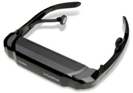
Bank commercials and Queen music aside, you want to have this up and running in your practice immediately. Here’s the easiest way to get everything you need. Tonight.
- Find your nearest Brookstone store and call them to make sure that they have a pair of these Vuzix™ iWear® AV230 XL Video Glasses ($200, plus tax) in stock. Go get ’em, tiger.
- Look through your home collection of DVDs for those with the most appeal over a wide variety of patients. Don’t forget to grab a few of those TV series’ episodes for those shorter appointments as well.
- Steal your children’s portable DVD player that they don’t watch in the car anymore because they all have video iPods now.
- Buy a bunch of AA rechargable batteries and a recharger, plus alcohol wipes for infection control, and some sort of basket or nice box to keep it all together when moving it from room to room.
- Hand over the box of video goodies to your assistant, who will take it all from there.
Cost: Less than $300, unless you have to purchase your own DVD player (around $100) and videos.
Track Two: Keep it simple.
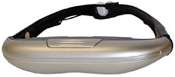 Efficiency is key to this next setup. You want something simple for your team to implement, that will work consistently, and appeal to the broadest spectrum of patients possible, from the 30 minute appointment to the full-mouth rehab. Everything can be purchased online and delivered to your office within the next week.
- Purchase these 3.5 ounce i-Theater Glasses ($179) direct from the manufacturer, i-O Display Systems. Be sure to add a set of hygienic earbud covers ($20 for 25 pairs) to your shopping cart. The rechargeable batteries are included, as is an AC power adapter.
 Get the right kind of DVDs. This is so important. Nothing with a plot because your patients won’t ever want to leave, or worse yet, you’re such a generous dentist that you’ll let everyone take the movies home to finish and then it’s a pain to keep up a decent office library. We recommend instead that you purchase some relaxing, endlessly looping DVDvideos. Our favorites are the Waves Virtual Vacations™ ($10-20), but you may love the music and nature videos at TV Artscapes ($16 and up) just as much. Your patients will want to be in your chair just for the ambience. Seriously.
- Oh yeah, you’ll need something to actually play those DVDs, and the ones with the their own screens make it easy for the assistant to get the system set up and running properly. Best Buy has the reliable Dynex® Portable DVD Player ($90) that seems to hold up to abuse and also holds a charge well. You can also simply keep it plugged in with its own AC adapter.
- The Box. It is a bit unprofessional to drag the gear and their cords and from operatory to operatory, so we like the Faux Leather Milk Cartons ($34 for two) from Target. They will stay looking good for many years, and are easy to keep clean.
Cost: $400-$500, shipping and tax included.
Track 3: That’s what I pay you for.
 Many of the virtual reality companies directly appeal to dentists to buy their products for patient relaxation and entertainment. MedPED Media has gone several steps further and created an entire package called InChair TV that allows you to relax instead, and leave everything to them.
They’ve taken the exact same Vusix™ glasses seen in Track One above and added a Walkman-type portable DVD player.
But then comes the cool part.
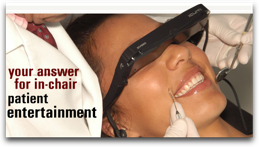
InChair TV has gone all Netflix over dentists and not only are they offering a monthly mail-in “rental” system, but inserted between the shows on each DVD are these cute little dental cartoons that advertise services you provide, like teeth whitening and veneers. Each monthly package comes with three 90-minute disks (Kids, Teens, Adults) and all content has been licensed for use in a place of business.
Cost: $518 for the first year (includes all hardware, shipping, and handling), $120 each year thereafter. 10% off when purchasing 3 or more.
_____________
The VR glasses can take a little getting used to if a clinician normally works from the 12:00 position, but otherwise they don’t seem to get in the way much at all. We recommend starting out with one set for the entire practice for a month or so, and if patients and assistants alike rave about your latest high-tech gadget, then go out and get a boatload of them.
This is real proof that slapping an extra zero at the end of a price doesn’t always happen just because a product is branded for the dental market. When there’s a will to make a good product at a fair price, there’s a way.
By the way, did you mean Will & Grace? Good Will Hunting? Or perhaps you’re more into There Will Be Blood?
Maybe you need a pair of VR glasses just for yourself.